Active Weather Powered by Netradyne Intelligence Helps Fleets Act Faster When Weather Changes
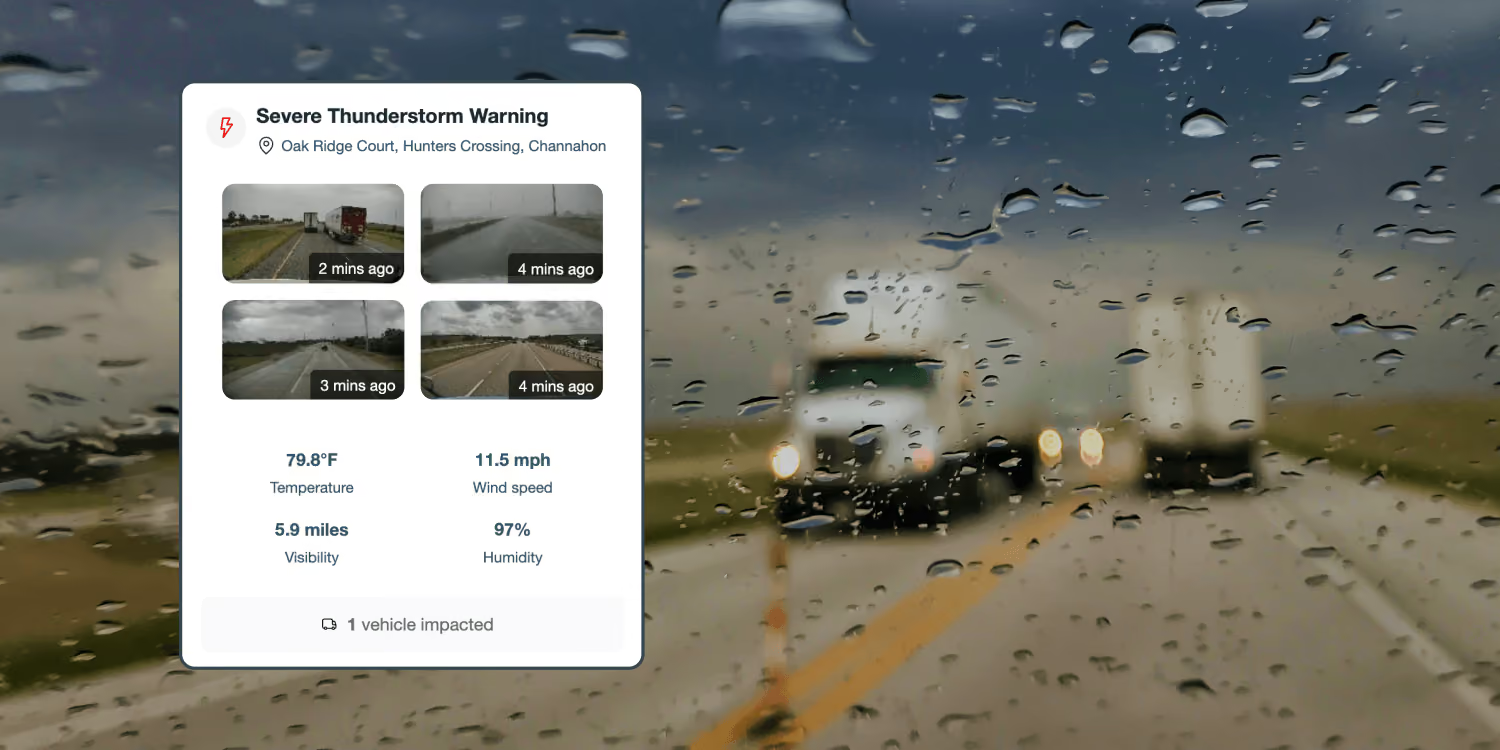
Weather can change faster than fleet teams can respond. A storm moves across a route. High winds hit a Midwest corridor. Rain turns a normal highway segment into a stopping-distance risk. Snow or fog reduces visibility in one area while nearby roads remain clear.
For fleets, the challenge is not just knowing weather is happening. It is knowing which drivers are affected, what conditions they may be facing and when action is needed. That is why we are excited to introduce Active Weather, a suite of new geospatial capabilities, powered by Netradyne Intelligence.
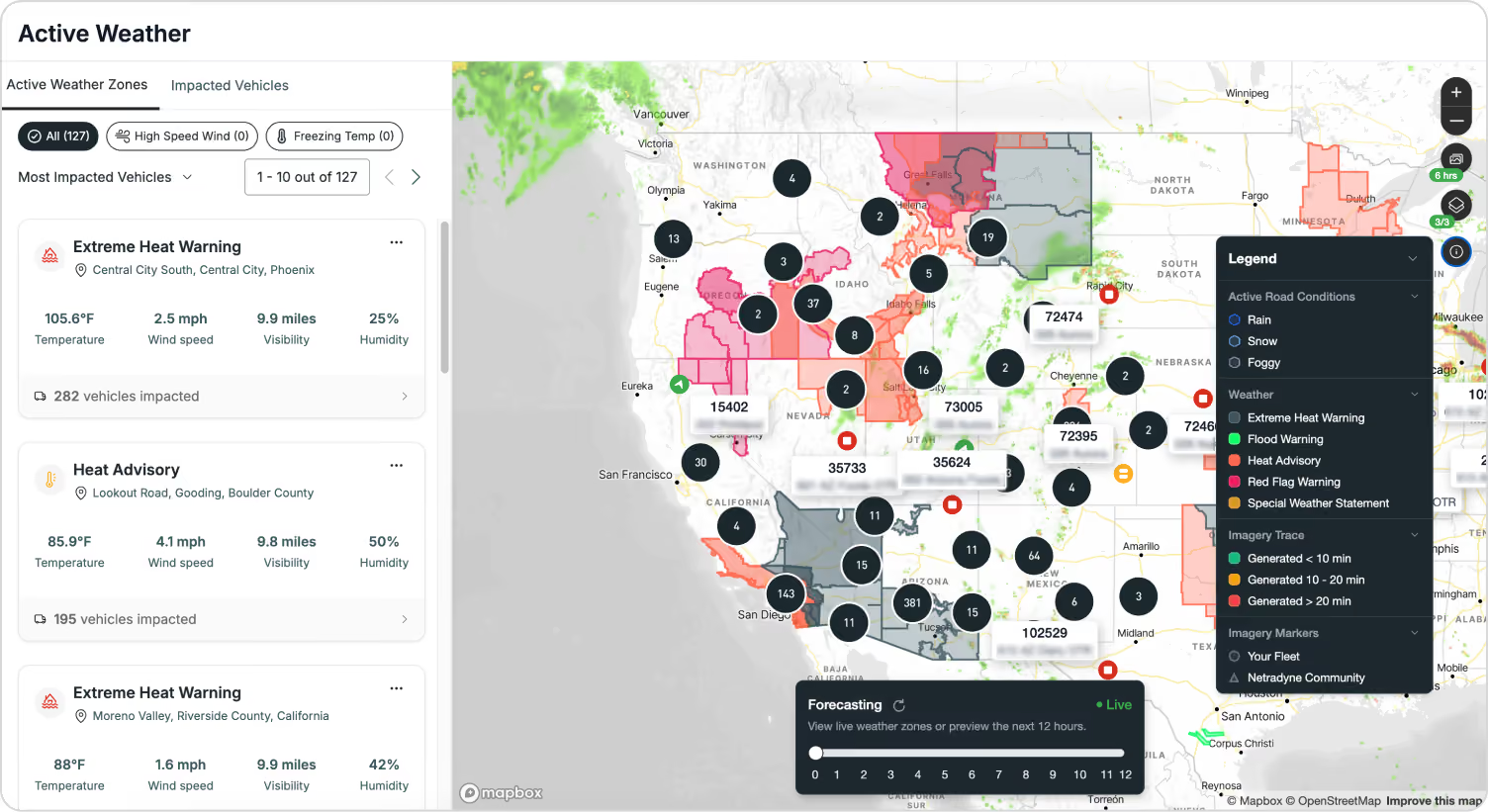
Active Weather brings National Weather Service alert zones, weather radar overlays, forecasts, impacted vehicles and road-level conditions into the fleet map, helping managers see where weather may affect vehicles and routes. It also supports drivers with in-cab alerts when they enter a National Weather Service watch or warning area or start a trip in one, or when adverse road conditions are detected through Netradyne Intelligence.
Weather affects safety, service and productivity. FHWA identifies adverse weather as the second-largest cause of non-recurring congestion, with snow, ice and fog alone causing 15 percent of non-recurring delay. Even light rain can increase travel time delay by 12 percent to 20 percent. In metropolitan areas, truckers lose about $3.4 billion, or about 32 million hours, each year in weather-related traffic delays. For fleet teams, weather visibility is an operational need, not just a planning tool.¹
Weather Belongs in the Fleet Workflow
Fleet teams already use maps to manage routes, vehicles and daily operations. But weather often lives somewhere else. Managers check weather apps, watch radar screens, monitor TV weather or wait for driver calls. That creates delays and blind spots when conditions change.
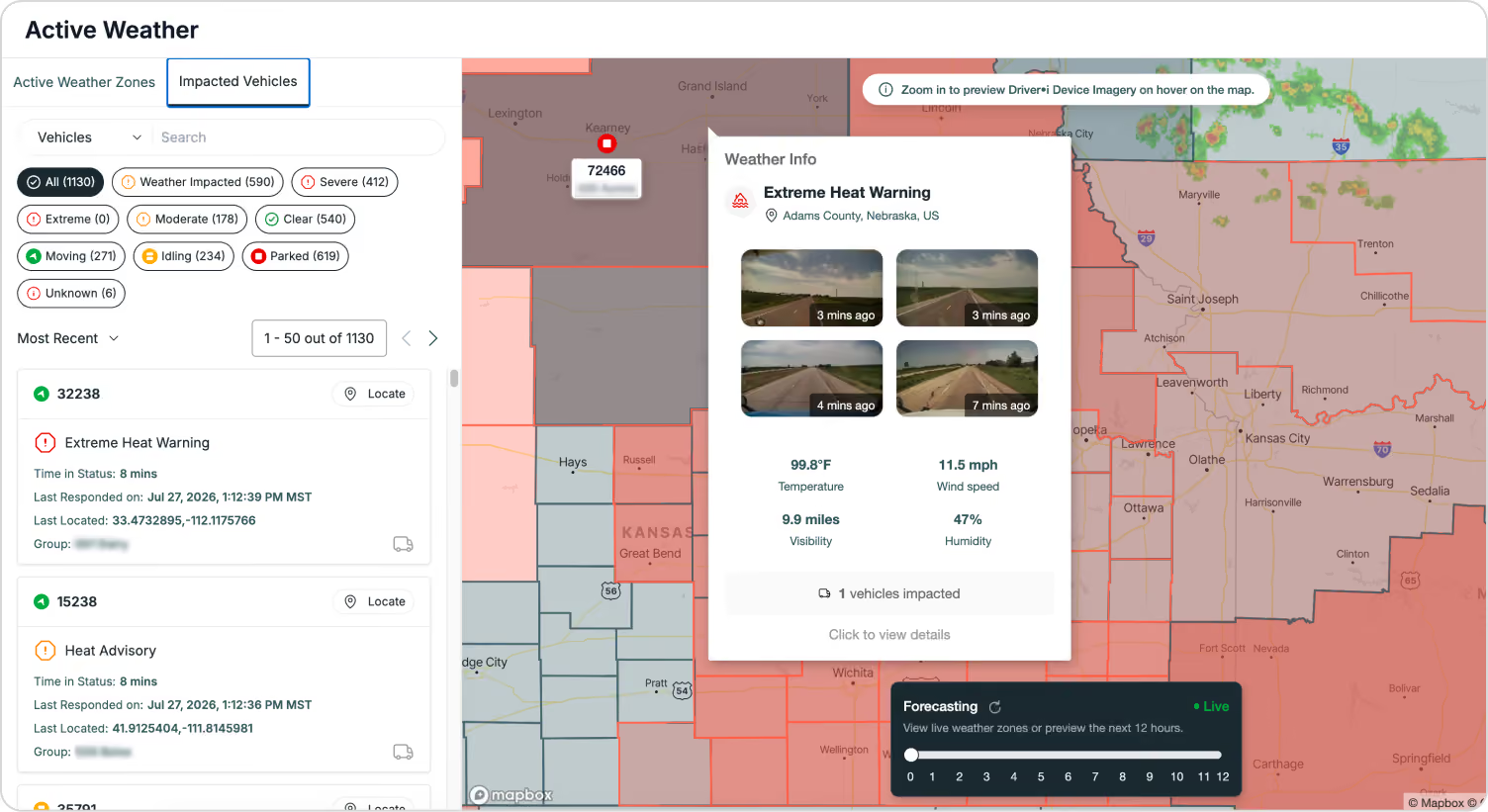
Active Weather brings environmental intelligence into the same workflow teams already use to manage the fleet. That helps safety and operations teams understand where conditions may affect routes, drivers and service commitments without switching between systems or waiting for field reports.
What Active Weather Includes
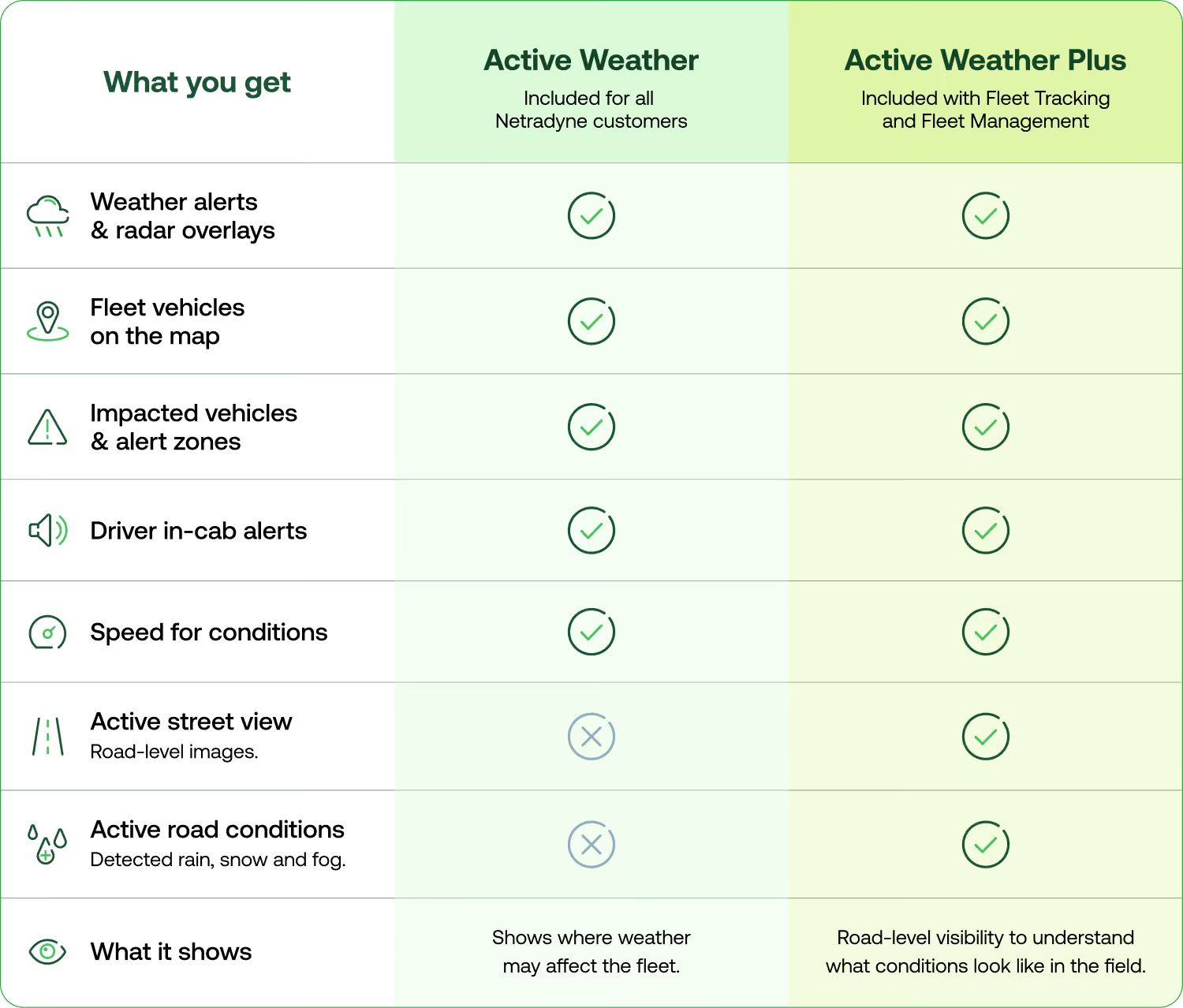
Active Weather is powered by the geospatial capabilities of Netradyne Intelligence. It connects public weather data, fleet location, vehicle movement, route exposure and Driver•i road-level observations so teams can see where conditions are changing and which vehicles may be affected. Active Weather Overlay and Speed for Conditions are included at no additional cost for all Netradyne customers as part of their existing Netradyne experience.
- Active Weather Overlay brings National Weather Service alert zones, radar overlays, forecasts and fleet vehicle locations directly into the fleet map. Teams can see which vehicles are operating in or near active weather zones, helping them prioritize follow-up without manually scanning the full fleet. Drivers can also receive in-vehicle alerts when they are entering an impacted area or starting a trip in one, giving them earlier awareness when conditions may require extra caution.
- Speed for Conditions uses the forward camera to detect rain, snow and fog to provide a heads-up alert when a driver is traveling over the configurable speed for conditions. This helps drivers adjust sooner when roads conditions may reduce traction, increase stopping distance or lower visibility.
Together, Active Weather Overlay and Speed for Conditions help teams bring weather visibility and driver alerts into the existing Netradyne workflow, so managers can see where weather may affect the fleet and drivers can get earlier awareness when conditions change.
Active Weather Plus Adds Road-Level Context
In addition to Active Weather, Active Weather Plus adds road-level visibility from the Driver•i network, helping teams better understand what conditions look like where drivers are actually operating. Active Weather Plus is included with Fleet Tracking and Fleet Management.
- Active Street View lets managers view recent road-level images from Driver•i-equipped vehicles, including their own fleet and Netradyne Community views where available.
- Active Road Conditions shows rain, snow and fog conditions detected by Driver•i-equipped vehicles, including their own fleet and Netradyne Community views where available.
Together, Active Street View and Active Road Conditions help managers move beyond broad weather alerts and better assess whether visibility is reduced, roads appear wet or conditions are worsening along active routes.
Scenario: High Wind Risk for Heavy Trucks
High wind is a major concern for heavy trucks and high-profile vehicles, especially across Midwest corridors. A weather alert may cover a broad region, but fleet managers need to know which vehicles are approaching the affected area, which drivers are already inside it and where action may be needed.
Depending on the situation, teams may need to slow drivers down, reroute vehicles, hold departures or increase monitoring along exposed routes. National Weather Service guidance notes that trucks, vans, SUVs and vehicles towing trailers are more prone to being pushed or flipped by high wind gusts.²
Active Weather helps managers see affected areas and impacted vehicles in the fleet map so they can guide drivers, adjust routes, delay departures or increase monitoring when wind risk rises. In-vehicle alerts give drivers earlier awareness when they are entering an impacted area or starting a trip in one.
How Active Weather Helps Managers
Active Weather helps fleet safety and operations teams bring weather, vehicle location and road-level conditions into one workflow. Managers can view National Weather Service alerts, radar overlays, forecasts and vehicle locations in the fleet map, then quickly identify the drivers and routes most exposed to active weather.
With Active Street View and Active Road Conditions, teams can assess what drivers may be facing in the field, not just what a regional alert says. That gives managers more context to guide drivers, adjust routes, delay departures or increase monitoring before conditions create more risk.
How Active Weather Helps Drivers
Drivers often encounter changing conditions first. Active Weather gives them in-vehicle alerts when they are entering an impacted area or starting a trip in one, helping them prepare before conditions worsen.
Speed for Conditions adds another layer of support by providing a heads-up alert when rain is detected and the vehicle is traveling over the company set speed limit for conditons. That matters because FMCSA guidance stresses that commercial motor vehicle drivers should reduce speed in adverse weather, road and visibility conditions. FMCSA also reports that 25 percent of speeding-related large-truck fatalities occurred during adverse weather conditions.³ Together, these alerts help drivers adjust sooner when weather changes.
A Smarter Way to Manage Weather Risk
Weather will always change. Fleet response needs to keep up.
Active Weather powered by Netradyne Intelligence helps teams bring weather risk into the same workflow they already use to manage vehicles, routes and daily operations. Active Weather Plus adds deeper field visibility through Active Street View and Active Road Conditions, helping managers assess what drivers may be facing from the network of Driver•i-equipped vehicles.
For managers, that means faster decisions and less manual work. For drivers, it means earlier awareness when conditions change. For fleets, it means weather risk becomes part of the safety and operations workflow instead of a separate system to monitor.
Availability
Active Weather, powered by Netradyne Intelligence, is available for the following customers:
- Active Weather Overlay and Speed for Conditions will be included at no additional cost for all US Netradyne customers as part of their existing Netradyne experience.
- Active Weather Plus will be included with Fleet Tracking and Fleet Management, adding Active Street View and Active Road Conditions for US customers who need deeper road-level visibility from the Driver•i network.
To learn more about Active Weather powered by Netradyne Intelligence, reach out to our team.
SOURCES:
1. https://ops.fhwa.dot.gov/weather/overview.htm
2. https://www.weather.gov/mlb/seasonal_wind_rules
3. https://www.fmcsa.dot.gov/safety/driver-safety/cmv-driving-tips-too-fast-conditions


Sie möchten Fahrer schützen und Kosten senken?
Das ist keine Trickfrage. Überzeugen Sie sich selbst mit einer Demo.